Ramona Rosales
Mar 27, 2015
Kendrick Lamar Blasts 82-1 on Billboard Artist 100, Dethroning Taylor Swift | Billboard
Ramona Rosales
Mar 25, 2015
Pop is still king of the world’s music genres
turning point in a number of markets, it seemed like a good time to
analyze the retail sales of several music genres to see whether the
downturn and subsequent stabilization have been equally divided across
genres or whether some genres have suffered more than others. The
analysis shows that pop and rock have strengthened their hold on music
sales, while rap/hip-hop, the darling of the 1990s, has suffered a
decline.
The discussions surrounding recorded-music sales and what to do to
solve the decline in recent years has often dealt with recorded music as
a single entity. There is also a commonly held assumption that all the
musical genres and subgenres have suffered in equal measure. Music & Copyright has analyzed the retail sales of the different music genres over the previous decade to establish whether this is the case.
The results are, in part, not totally surprising, with pop and rock
music tightening their grip on retail sales in the 2000s. But
rap/hip-hop, which surged in the 1990s, slipped as public criticism
mounted. Sales of jazz, classical and other smaller genres also fell
off.
It is probably worth stating that the classification of any artist’s
music into a single genre is fairly arbitrary and can differ between
record company, music retailer and national trade association.
Categorizing music within a genre can often have multiple influencing
factors, such as musical technique, style, context, target audience and
geographical origin. Moreover, many genres have subgenres that can
overlap others. For example, media-management service Gracenote
categorizes music into more than 1,600 individual genre categories. To
confuse things even more, several studies have been published in recent
years describing theoretical and scientific approaches to determining a
music genre. However, for the purposes of this study, Music & Copyright
has limited itself to the most commonly used genre categories by most
national trade associations when presenting a breakdown of sales by
genre.
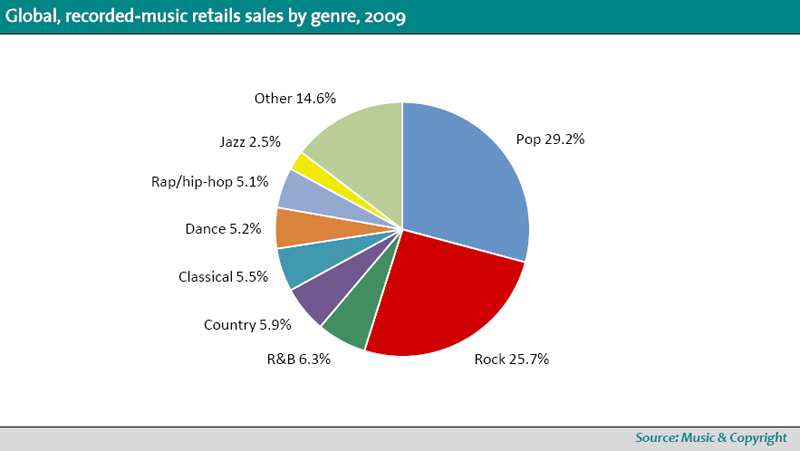
The two most popular music genres in terms of retail sales over the past 10 years are pop and rock. According to Music & Copyright,
retail sales of pop music stood at US$7.4 billion in 2009, while retail
sales of rock music stood at US$6.5 billion. In terms of revenue share,
pop accounted for 29.2% of global music-retail sales last year, with
rock taking a 25.7% share. The closeness of the two genres at the end of
the last decade was also apparent at the beginning. In 2000, pop had a
global sales share of 27.8%, with rock at 22.7%. Despite a difference in
year-to-year share performance, the retail-sales decline of the two
genres in the previous decade has been fairly even: For pop, retail
sales decreased 27.7%, while retail sales for rock fell 22.1%. However,
both genres outperformed total music-retail sales, which fell 31% in
2009, to US$25.4 billion, from US$36.9 billion in 2000.
With pop and rock accounting for a combined retail-sales share of 55%
in 2009, other genres have clearly underperformed when compared with
the global sales decline. Music & Copyright has found that
the retail value of rap/hip-hop sales dropped almost 50% between 2000
and 2009. It should be noted that the performance of particular genres
of music that are more popular in some larger markets, such as the US
and Japan, will also be reflected on a global level because of the high
share of retail sales in those markets. However, rap/hip-hop has
received criticism in recent years, particularly in the US, for its
close association with violence. A poll a few years ago of black
Americans conducted by the Associated Press and AOL-Black Voices found
that half of all respondents described the genre as having a negative
image.
Retail sales of classical music and jazz have also experienced a
faster decline than the global average. For these genres, as well as
some other genres grouped in this study as part of “other,” the
reduction in floor space by brick-and-mortar retailers of slow-selling,
low-margin genres in favor of better-selling items, such as DVDs, video
games and consumer electronics, has had an impact on availability and
subsequently sales. Moreover, the transition to digital and away from
physical soundcarriers could be having a negative effect on the retail
sales of the more-niche genres. For example, classical music is
available online, but this on its own is not enough to secure sales.
Except for searches for specific titles, browsing for classical music
can be more restrictive online than in a physical store, because a
consumer can see only what is displayed on his monitor at any one time.
If digital-music services do not have helpful links, charts, submenus
and subgenres, freely browsing a genre without significant background
knowledge is almost impossible.
Although some genres that are more popular in a limited number of
countries are included in this analysis, some are not. Country music,
for example, is included, because it is more popular in the world’s
biggest market, the US. The number of country-focused radio stations
outnumbers most other genre-based stations. Because of this, a large
number of country tracks figure in the Billboard Hot 100
singles chart, which is based on airplay rather than sales. However, in
terms of retail sales, the genre accounts for about 12%, compared with
more than 30% for rock. Even so, despite much-lower retail sales of
country music elsewhere in the world, the high level in the US resulted
in a global share of 5.9% in 2009.
In contrast, religious and Latin genres – such as Musica Popular
Brasileira, which itself incorporate subgenres such as samba and
samba-cancao – sell well in many Latin American countries. But because
Latin American countries account for a much lower share of global retail
sales, these genres have been grouped as part of “other.” [Editor’s
note: please check the more recent genre blog which has more up to date
figures for 2010]
Music & Copyright is a fortnightly research service published by Informa Telecoms & Media.
| Music & Copyright's Blog
Mar 9, 2015
iTunes compilations: what holds them together?
album from the iTunes Store, Amazon, or other vendor—there are a number
of tags you can set, such as the album name, artist name, and genre. But
there’s one tag that seems to confound a lot of iTunes users: the
compilation tag. Here’s an overview of what the compilation tag means,
what it can do for you, and how to work with it.
First, what exactly is a compilation? Technically, it’s an album
with multiple artists but not, for example, a best-of album by a single
artist (although the iTunes Store does in fact consider many Greatest
Hits albums to be compilations). Since iTunes and the iPod can sort
music by artist, when you go to view an album by a given artist, you
expect to find full albums. But with compilations—say a movie soundtrack
with songs by ten different performers, or a Time Life collection of
the greatest cowboy songs to sing along with in the shower—you’d only
find one or two songs under an artist’s name. Also, you wouldn’t be able
to play the entire album without creating a playlist for it, or by
searching for the precise album name. For this reason, iTunes has a
compilation tag that you can set to give special status to these
“various artist” collections.
can change the compilation status of any album by selecting its tracks
and choosing Yes or No from the Part of a compilation menu.
this tag on a group of tracks—it’s one you toggle between Yes and
No—has a number of effects. First, it groups the album together rather
than leaving the music spread out among its various artists (as long as
all the tracks have the same album name). For example, if you use the
iTunes Browser (Command-B shows or hides the Browser, and the View ->
Column Browser submenu lets you choose how it’s displayed), tracks in
compilations won’t show under the names of their artists, unless you
have other, non-compilation albums by the artists on the compilation. If
you have the Composer tag filled, however, all tracks from compilations
will show up in the Composer column of the Browser. A
practical option in iTune’s Advanced preferences lets you group
compilations at the top of the browser: check Group Compilations When
Browsing, and you’ll see a Compilations entry at the top of the Artists
column so you can find your compilations easily.Setting an album as a
compilation—or not—is easy to do. Select all its tracks, then press
Command-I, and click the Options tab. Choose Yes or No from the Part Of A
Compilation menu, then click OK.
Viewing compilations on your iPod is a bit different from iTunes’
solution; there’s no option to group compilations under the Artist menu,
but if you go to Settings -> Music Menu, you can check Compilations
and have your iPod display a Compilations sub-menu. On an iPhone or iPod
touch, however, Apple decided that it would be better to list songs
from compilations under their artist names. However, you have a choice;
if you tap Music, then More, there’s also a Compilations menu, so you
don’t need to change any settings to find your compilations.
Unfortunately, you can’t turn off the display of compilation tracks in
the Artists list, and if you have a lot of compilations, your Artists
list can get pretty long.
While compilations can be great, they can also be a headache. Let’s
say you rip a CD and can’t find it in your library. This can happen if
the Gracenote tag information, which iTunes searches for on the Internet
when you insert a CD, has the Compilation tag incorrectly set for that
album. You can change it, of course, but you may scratch your head
trying to find the album to do so. For this reason, you might want to
always have compilations display in the browser (assuming you use the
browser), or create a smart playlist with the condition Compilation is
true, so you can always find your compilations.
Another problem related to the Compilations tag occurs when only some
songs of an album have that tag set. You may find an album in iTunes
that shows as if it were two separate albums. Select all the tracks and
set the Compilation tag to No to group the songs correctly.
One final curiosity related to compilations. Since iTunes doesn’t
record these albums by the names of their artists, it stores the files
in a special way. In your iTunes Media (on iTunes Music) -> Music
folder, you’ll find a folder named Compilations with all of albums
tagged as such.
[Senior contributor Kirk McElhearn writes about more than just Macs on his blog Kirkville.]
Mar 3, 2015
The fundamental music genre list
How are your digital music genres organized? Are they general musical styles, like 'rock' or 'pop' or are they very specific,
like 'ambient techno' or 'bubblegum pop'?
Having a coarse grained genre classification for your MP3s can have
advantages. What's a coarse grained classification? It means
there are few genres, probably fewer than ten, with a lot of music
assigned to each genre. The genres are likely to be general, like the
'rock' or 'pop'
examples I gave earlier. We could call this the fundamental music genre list because the genres are the fundamental,
elemental building blocks of musical genre, from which other, finer grained genres come.
Adopting the fundamental music genre classification, or any coarse grained classification, has a number of advantages:
- Fewer genres to navigate when you are looking for music to play
- When constructing shuffled playlists from a genre the playlists are longer
coarser grained the genre the more variabilty exists within the genre.
This means playlists constructed from a genre can vary quite a bit.
Genre is only a guide to styles of music. Genre is largely derived from
musical
period, the instruments used and techniques used to play them.
So which genres go into our fundamental music genre list? We're aiming
for coarse grained genres, ideally as few as possible while maintaining
clear distinctions between genre. To help us, many of the
online music databases publish a list of genres,
which they assign artists and releases to. Here's a selection:
| FreeDB | Discogs | Wikipedia | allmusic |
|---|---|---|---|
| Blues | Blues | Blues | Blues |
| Classical | Brass & Military | Classical | Classical |
| Country | Children's | Country | Country |
| Folk | Classical | Electronic | Electronic |
| Jazz | Electronic | Folk | International |
| Newage | Folk, World, & Country | Hip-hop | Jazz |
| Reggae | Funk / Soul | Jazz | Latin |
| Rock | Hip-Hop | Reggae | Pop/Rock |
| Soundtrack | Jazz | Religious | R&B |
| Latin | Rock | Rap | |
| Non-Music | Traditional | Reggae | |
| Reggae | |||
| Stage & Screen |
- Blues
- Classical
- Reggae
within. I could break classical into romantic, baroque, ballet,
neo-classical,
minimalist... and so on. Still, we are aiming at brevity, so classical
it is.
Next, there are the genres agreed by at least three sources:
- Country
- Electronic
but let's combine them as 'hip hop'. I will add 'New age', because I
don't
think it applies to any of the other genres. I think 'Folk' should
include 'World' music and therefore 'Latin' and 'International' styles
also (ideally, 'Folk' music I believe to be music distinctive of a given
culture; much so-called 'Folk' music I think these days is actually
'Rock'
played with acoustic guitars). 'Pop' depends on the style of the
'Pop'(!); 'Pop' can be considered part of 'Rock' music, given its
traditional rhythm
and blues origins, or perhaps Electronic, depending on the nature of the
music. Therefore, it doesn't make the list. This leaves us with our
final listing:
The Fundamental Music Genre List
- Blues
- Classical
- Country
- Electronic
- New age
- Reggae
If you
have a library biased toward particular types of music, which most
people probably do, it makes sense to expand the genres granularity of
that genre. For instance, if you are a classical music fan with a few
jazz records, retain the above list but expand classical into, as
mentioned
before, baroque, romantic, minimalist etc.
So, maybe the conclusion is that the fundamental music genre list is a start point, from which you
can expand the detail of genres as your music collection demands.
- bliss
Feb 27, 2015
A blissful approach to automatic MP3 genre classification
It's been a long time coming, but I'm finally putting some thought into how automatic genre classification will work in
bliss. This blog post constitutes my current thoughts as to how genre classification will work. I'm hoping anyone
with comments or concerns will voice them in the comment section below.
What's the problem with digital music genre organisation today? The first problem that bliss will attack is a
lack of
consistency. I've already written about
how
easy it is for your music library to experience an explosion of genres. When your digital music is ripped from CD the
genre is typically populated from one of the free online databases. This gives you some information but, because
people decide to use the genre tag for different purposes and record genres in different ways you soon end up with an
inconsistent music library.
In my own library I have a number of issues:
- Genres recorded at different levels (e.g. some 'Rock', some 'Britpop')
- Completely incorrect genres (Let It Bleed was originally
categorised as Classical for me!) - Misuse of the genre tag, for instance where artist names are re-populated in the genre tag
should appear within your music library, with the aim of achieving a consistent, navigable and useful genre organisation.
This also being bliss, development on this functionality will occur piecemeal, with small portions of useful functionality
being released little by little. Initially, I shall concentrate on genre consistency, rather than correctness. The features
described here may change with time as new abilities are added.
So how will genre classification work?
Fundamentally, you will use a genre tree to specify which genres are allowed in your music library. That sounds a quite simplesolution to solve genre consistency, but I think it's quite powerful. Here's how the UI might look:
The 'Fill in missing genres' works as before.
If genre is missing for a given album, bliss looks it up online.
The 'Allowable genres' tree defines the allowable genres in your music
collection. The list will be far larger than the one shown
(obviously). I am thinking of using something like the AMG genre list, the
Wikipedia list or my own
fundamental music genre list
(with more specific
genres copied from the previous sources). Genres are laid out in a
hierarchy and any node in the hierarchy can be selected. By default
all are selected. Once these
selections are applied, as usual, bliss applies the assessment and fix cycle. I'll explain assessment first, as it's easiest.
If bliss sees an album with a genre that is not ticked, then it is marked uncompliant. That's simple!
Fixes get more complicated. The existing genre is looked up in the genre
tree. If it exists, bliss traces up the tree, parent by parent,
until the first checked genre is found. It then suggests a fix to change
the album to this genre. Initially this will be manual, as
normal. If a genre is not found, bliss suggests changing the genre to
whatever is in the 'When no match' dropdown. This will be one of
"Use 'Other'", "Use 'Unknown'", "Blank" or "Leave as-is".
Here's how the example above would be processed:
- If an album had the genre "Classical", "Rock", "Indie" or "Metal" it will be compliant
- If an album has the genre "Opera" or Ballet", it will be uncompliant and bliss will suggest changing it to "Classical"
- If an album has the genre "Grunge", it will be uncompliant and bliss will suggest changing it to "Rock"
- If an album has the genre "Heavy metal" or "Thrash metal", it will be uncompliant and bliss will suggest changing it to "Metal"
about the number of genres involved, and also whether the genre list I
have
will cover most of the genres people have out there. Still, nothing
ventured, nothing gained...
Some brief ideas for future functionality...
- Make the genre recategorisation automatic
- Allow the genre tree to be edited
- Support multiple genres
- Support multiple genre fields (some people use STYLE and GROUPING fields to accomodate different levels of genre)
- bliss
Feb 23, 2015
An Essential Guide To Organising Your Music Library
How you decide to classify your files really depends on on where, how and on what equipment you intend to access them. Pic: jachim.net
themselves we can turn our attention to the real meat of organising
your music library, how to classify or label the tracks. This is the
most important but the most arduous part of getting your music library
organised. Your approach to this will impact the usefulness of your
complete library, your workflow from download to deck-load, and the way
new tracks are added to your library.
If you look at the previous articles in this series and the numerous discussion threads on music organisation and labelling that have appeared over the years on the Digital DJ Tips forum
and elsewhere, you'll see how vocal people are in recommending the way
they organise their tracks and folders. Many people advocate a simple
structure such as "Artist - Title" for the filenames and group them
under genre or date folders of various denominations. Others prefer a
more comprehensive filenaming convention or ignore the folder structure
completely, allowing their operating system or software to take care of
it for them.
Regardless of the recommendations in this article or that from other people, the most important thing is that you classify your music in a way that works for you and your DJ set-up.
This encompasses more than just whether you can be bothered to put a
structure in place. This is about how the library will be used, where
and when it is to be accessed and what you expect to get out of it. This
stuff is more important than whether you choose to rename your files in
a certain way, or what folder names you go for.
The important questions to ask before you begin
Some of this might seem obvious but you can break it down by asking yourself questions like these:- When I DJ, what track attributes or information do I need to help me
find a track, know when I should use it and whether it will mix in with
my set plan? - If I am not able to have my entire music library with me to listen
or DJ with, what track information will help me decide what to take with
me or how to arrange playlists that I can have? - When I am just listening to my music library, how can I learn more
about the music tracks and how they might fit together in a mix? - Does the software or hardware I use to DJ or play back music have
any restrictions or requirements on how my music should be organised?
library in different scenarios. This is really important because it will
only work if your library is classified in a consistent manner that is
adaptable for these differing purposes.
DJ
Tiesto, DJ Tiësto, Tiesto or Tiësto? Mix the spellings and choice of
'DJ' or not up and he'd appear in potentially four different places in
your library.
A real-world example: The case of Tïesto
I'll give you an example. In my library I have a couple of studioalbums, several mixed and unmixed compilations, individual tracks and
also remixed tracks, all by by the world-famous DJ Tiësto. Over time
this artist has has dropped the "DJ" title from his name and spelling
inconsistencies lead to me having a mixture of "Tiesto" and "Tiësto"
labelled across artist, title and album.
This is only a mild irritation when searching for tracks by Tïesto
using a modern computer application but with results being ordered for
both "DJ Tiësto" and "Tiesto" this slowed down my ability to find tracks
as I had to perform an extra step myself once these results came back.
In my main DJ software, Traktor, some fields that are available in my
music library software, iTunes, are not visible at all or vice versa,
so searching for "Tiesto" under Traktor's remix field comes back with no
results as this has not been populated by iTunes. So if this were an
important field for me I must have this information completed. This is
an example of needing to ensure that I have enough of the basic
information consistently classified so that searches in both
applications work as expected.
When I transfer some or all of these tracks to my mobile phone I
could have the added complication that these tracks could be listed as
having an artist starting with the letters "D" or "T" depending on which
name was used. Thankfully there are features that can help to avoid
these kind of situations (e.g. Album Artist field and smart search) but
the principle is that by consistently classifying the information about
each track, you can avoid many of these pitfalls from the start.
The different places for classification
The need to consistently classify your music applies to the folderstructure, the filenames, the tags inside the files themselves, and
often a separate database kept by your DJ software too! It's just up to
you to determine the level of detail and classification you want for
each of these.
If you're storing your library on a USB stick which gets plugged into
a digital controller, then navigating around your collection might be
the main challenge. Search capabilities are limited without a full
keyboard to type on so in this case you will need to create a folder
structure and concise filenames that are not only compatible with the
hardware you use but can be easily navigated using the scroll and push
buttons on the hardware itself. Such a folder structure may well be
based on genre, artist, date or prepared playlists depending on your
needs.
In contrast, most software based DJ systems do not put much if any
reliance on structured folders and filenames. In all cases, however, the
classification of track metadata tags is paramount to how the hardware
and software tools read your music files and how they allow you to
interact with them. Let's get stuck in, then, by looking more closely at
these.
Folder structure
In the previous article I introduced my approach to music formatsprior to reorganising my music library. I faced another challenge around
filenames and folders. Though I use iTunes to manage my library I had
previously been strict about how I manually structured my folders,
primarily grouping them based on their genre. Over time this system
stopped working, and more worryingly I found that it was of little
benefit to me as I rarely needed to navigate my tracks directly in a
file manager. Added to this I found that catagorising the genre of a
track, and more so the genre of an album, compilation or single release,
didn't always fit and the effort to do so didn't add value to my
workflow or my library.
In my case then, in my reorganisation I revised my folder structure
by simplifying and flattening it, allowing the files and individual tags
to do the hard work. I now have ten high-level folders broken down as
follows:
CD Albums
CD Compilations
CD Singles
Download Albums
Download Compilations
Download Singles
Other Albums
Other Compilations
Other Singles
Videos
Under each of these main folders are either folders containing the
whole album/compilation, or group of tracks. The only exception is the
"Download Singles" folder which is split by year from 2006 to 2013 based
on the release date of the track, not the import date. Purchasing
individual music tracks for download is, like most of us, my primary
method of getting music for DJing so my music folder structure has been
streamlined based on source. I don't need anything more for my needs but
of course yours will probably differ and that's exactly the point -
make the structure that works for you.
Filenames
What about the filenames of each music track? Again, you will want aformat that works for you. Many people like the simplicity of "Artist –
Title" but if you’re searching for files you may come across duplicates
due to the same track appearing as singles, on albums or in
compilations, so you’ll need to consider the effect of this on your
whole library.
Some of the tools I use such as MP3Tag and Bulk Rename Utility
have really useful features that not only convert the metadata tags
into filenames but can also batch process multiple tracks at a time.
Learning to use these tools effectively will really speed up your
workflow and we’ll look at tools like these in a forthcoming article.
This is one area where PC users have an edge over Mac users, who have a
lack of decent MP3 bulk processing utilities.
For my purposes I have decided to use a slightly more robust
filenaming convention that allows for some of the core tag information
to be presented in the filename itself like this:
Album - Year - Track# - Artist - Title
This format gives me the flexibility to know enough about the track
in isolation from the folder it is contained in but also retain
non-subjective information about the track that will never change.
Obviously, in order to construct this filename the information must come
from somewhere… the tags!
Tags and metadata
Metadata is simply "information about data", and in our caseinformation about the music tracks we own, play and DJ with. These tags
are elements we can use or create to describe different attributes of
these music tracks. So, for example, we all know that each track is
called something, its name or title. It also has someone who created it,
the artist.
The artist and title are the two most common tags in every music file
but how might we consistently classify them and what about all the
other tags that we might have at our disposal? I’m going to share some
suggestions and preferences on the tags I use but again, you will want
to determine what you need and how much effort you’re willing to put in
to get it right.
Title
Probably the most important tag is the name or title of the musictrack. This is usually the existing name but it often gets sullied by
other information. The biggest culprit is the addition of "(feat.
ARTIST)". In my view, there should be no artists mentioned in the title
of a track as that's what the artist field is for. As DJs, however, we
know that there are different flavours of the same-titled track, known
as remixes. You may wish to separate the remix in a different tag but
for my purposes and to ensure compatibility with multiple applications I
add the remix in square brackets after the title e.g. "Chasing Summers
[R3hab & Quintino Remix]". Some songs/tracks have a subtitle in
normal curved brackets hence I have chosen to use square brackets for
all remixes.
Artist
Knowing who produced or made the track can help you find tracks bythe same person or group. When artists collaborate then you may want to
know who the individuals are. Although there is a separate Composer
field that could be used for this, it’s often simpler to have the main
and featured artists together in the artist tag. For example, "Far East
Movement featuring Cover Drive".
It sounds obvious but this should be the year the track was released.
Sometimes this can be complicated by tracks being released or found on
compilations years after the original release date. It’s up to you how
pedantic you want to be but I’ve found it useful to include the full
release date rather than just the year in this tag. For example, the
track "Don’t You Worry Child" has the year set as "2012-10-05" in both
the tag and the filename. I know from experience and quirks with Traktor
that the year tag can get truncated so by having it in full I have
converted this to the release date visible in iTunes and retained all
information in multiple places.
Album
iTunes and many other applications use this tag to refer to acollection of tracks by one artist or the name of a compilation. For
DJ’s you should think of this as the release name i.e. the name given to
the single or set of tracks under that single release. This will ensure
that different mixes are contained under the same release and that you
can group associated tracks accordingly. The album tag can therefore
range from compilations e.g. “Club Life Vol. 2, Miami” to single
releases such as “Titanium”. Consistency in the way you name sequential
releases also helps to sort your library.
Track
This is the track number relative to the total tracks on the releaseor album. It doesn’t have much use in DJing unless you are playing
tracks in a particular sequence or want to play an entire album in
order.
Genre
This field is very useful for DJs so do not rely on the musicdownload store telling you what the genre is - quite often it’s
misguided or inaccurate. Some of us dissect our music to the finest
levels of sub-genres just so we can play a varied set. The problem is
that genres can be very subjective and with musical styles changing and
evolving over time the genre of a track from 10 or 20 years ago may not
fit its description today or that of tomorrow.
You can of course decide that you will attribute this field to your
opinion of what a genre is and this is fine so long as you know what it
means and are consistent with your classification. Having too many
sub-genres makes some tracks difficult to place and reduces some of the
variety in track selection, but having too few genres makes it difficult
to differentiate the style and fit of the track into your set. Is it
progressive dubstep or aquatic urban house?
Also known as tempo, this field is accessible in iTunes but often
populated by another application through track analysis. Usually you
shouldn’t need to amend this field manually but it is important that you
have access to it when DJing. With breakbeat music such as drum and
bass and dubstep the tempos can often be inaccurately measured as either
half or double what they actually are so make sure you use your DJ
software to correct this before you start sorting on the BPM field. If
you only play a certain style of music the tempo of these tracks are
likely to be within a specific range e.g. 120-130 BPM, and this makes it
easier to spot errors and find tracks that don’t fit.
Another really useful tag for DJs who mix harmonically. Popular
software such as Mixed In Key can analyse your tracks and determine the
musical key, and with Traktor and Virtual DJ also now doing this
automatically there’s no excuse not to have some key information in your
music library.
Rating
Most DJ guides recommend using this field to represent the energy of atrack so you know what effect it will have on the set you are trying to
build. This is a good idea but there’s nothing stopping you from
putting the energy of a track into another field such as the Comments.
Either way, you should use this field to give some comparative
information of how good or powerful the track is.
Personally I use this field to indicate how much I like the track or
how popular I perceive it to be and whether I would enjoy playing this
for my audience. Ultimately it’s my preference and one of the reasons
for this is that when I’m not DJing I like to be able to use this to
formulate playlists based on tracks I genuinely like. I use two stars
for an average track, one for something I would never want to play or
that is not even a proper music track eg an intro in an album, three for
a good track, four for a really great tune and five stars for something
truly special.
Don’t be afraid to use the full range of stars. That’s what they’re
there for and just because you have tracks rated as one or two stars it
doesn’t mean you should delete them. Likewise, something must be wrong
if you have too many five star tracks.
Release Date / Date Added
These are two separate tags and they need to be treated that way toget the best out of them. A musical timeline is an important thing in
DJing because quite often we’re eager to play our newest tunes to the
crowd or the tunes that are most popular with the crowd and current
media ie upfront tracks. The danger is in confusing something we’ve just
recently discovered with something that is actually new.
The Release Date is closely associated with the Year tag and as such
tells us when it was first available for public access. I frequently
download tracks which have been requested for a gig but which are a few
years old. If I insisted on organising my library purely based on import
date then I may end up with lots of new tracks (new to me) that are
actually old or unknown to the audience.
Both fields are therefore useful and need to be managed accordingly
based on what you’re looking to get out of the set you’re playing. Don’t
rely on just the date that tracks were added to your library or just
their release date, use both.
Comments, Grouping, Description, Composer
iTunes has a few other fields which can be used to filter andorganise your tracks. Again, you should decide on a consistent way you'd
like to classify their use. The Comments tag is an obvious choice to
put your thoughts on the track, describe its structure, components or
just say what you like about it, basically anything to help you recall
how the track sounds and what it might mix well with. This tag is also
usually accessible from other applications such as Traktor but check
with your equipment before committing to using a specific field or
format. The Grouping tag is useful to pull together tracks of a certain
type or add another level of definition based on what you need. Other
fields that iTunes allows free text in are Composer and Description
(found under Video properties). Personally I use these tags as follows:
- Grouping – Source of music file e.g. CD, download, music store, album etc
- Comments – Energy level of track relative to the genre,
rated 1 to 3. A house track rated at 3 will not be equivalent to a Drum
and Bass track rated at 1 (or 3). They’re completely different styles
and so the energy levels cannot be equated in the same way - Description – Useful for additional information about the track or album eg subtitle or DJ mix
- Composer – Unused apart from pre-filled information
your disposal. Traktor, for example, has a Comments 2, Producer and
Remixer fields. These are useful tags if you have sufficient information
to get the best out of them. Just be aware that some of these tags are
not written to the files themselves (they may be kept in a separate
application-specific database) or will not appear or be accessible in
other applications. You will need to assess when and where you need
access to which tags and whether they are available throughout your
workflow and usage requirements. Sticking to the most common tags will
certainly help you with this.
Finally...
I've presented my system here mainly to make all of this more realand to ensure it's not just an exercise in dry theory. As I said, it
works for me - the same system probably wouldn't work exactly for you.
The important things are preparation (hence there have been several
articles getting you ready for this one), and knowledge of why you're
doing this in the first place (hence the questions at the start of this
article). Then, an understanding of where your music is tagged
(filename, physical folders and playlists, software databases etc) will
help you to work out where you should do your organising.
It's important not to get too bogged down in all of this; remember
that vinyl DJs could put records basically in boxes, and then in order
within those boxes, and that was it. Anything you manage to achieve
digitally past this is simply a bonus. And the single most important
thing of all is that no music organisation system is a substitute for
actually knowing your music, and knowing it well. If you're spending
time classifying your music and concentrating so hard that you can't
even have any music on while you do it... well, that's madness and shows
that you're thinking too much about the system and too little about the
music. Keep a balance! Until next time...
• André is a UK-based part-time mobile DJ with over 15 years’ experience.
- Digital DJ Tips
Feb 3, 2015
Gangsta rap is dead – and Suge Knight’s arrest has buried it
The activist work of the victims of the alleged homicide, like the
rebuilding of Compton itself, throw into bold relief the fact that
hip-hop has moved on
angsta rap is dead. In fact, it’s been dead for a good while now. But
nothing signals the demise of the genre and its influence on American
popular culture more than the recent alleged vehicular homicide involving Marion “Suge” Knight.
In the early to mid-1990s, Knight was one of the most feared figures
in the music industry. I remember being part of the Philadelphia media
core that had an opportunity to interview him on one of his rare trips
to the City of Brotherly Love. In the moments preceding what would be
his fairly understated entrance into the room where we were interviewing
him, you could smell the fear in the atmosphere. The local journalists
had read the stories and heard the rumours.
Knight was not to be “fucked with” and the quiet understated nature of
the ensuing group interview reflected his intimidating stature in the
world of pop culture.
But that was the mid-90s. In the new millennium, gangsta rap has been
displaced (and in some ways erased) by the kind of affective rap
popularised by artists like Drake and Macklemore. And the most popular figure from Compton, California, is not Ice Cube, Dr Dre, Knight or even The Game; it’s Kendrick Lamar.
Compton is not the Compton that Dre, Cube, Knight and others put on the
proverbial map of American inner-city decline and danger. Today the
city, lead by an innovative 32-year-old mayor Aja Brown, has declining crime and unemployment rates, complemented by a resurgence in business interests and investments.
What drew Lamar, Cube, Dre, Knight and others to Compton during the
week of the killing was the production of a commercial for a
feature-length film, Straight Outta Compton.
The film chronicles the early days of NWA and the heyday of the kind of
art-reflects-art-reflects-reality ethos that dominated that period in
hip-hop. Early buzz indicates it will be a major contribution to the
biopic subgenre in hip-hop film – but its very production also signals
the outdated and outmoded ways of being – in the hip-hop world at least –
signalled by the likes of former mogul Knight.
While his thuggish ways distinguished him in the world of gangsta rap
– helping to produce millions of record sales and generating media
attention that in turn produced more record sales – since the unsolved
murders of Tupac Shakur and Biggie Smalls, hip-hop culture and the music
industry that continues to profit from it has changed. It has moved on
from the sensibility that unchecked violence in the music has no
consequences in reality. It has; and it always did – and whenever this
kind of behaviour emerges or when people stumble from the tightrope
between hood life and the life of a rap artist, the results can be
fatal.
Knight will have his day in court. He will likely have a very good
lawyer. Early reports on the incident in question suggest Knight was
allegedly involved in some kind of scuffle with several men outside a
fast food restaurant. The deceased, Terry Carter, was an activist who
many say was involved in providing support and direction for young men
trying to avoid or emerge from lives of crime and gang violence. Cle
“Bone” Sloan, who was also allegedly struck by Knight and is expected to
survive, is the reformed gang member-turned filmmaker behind the
powerful HBO documentary Bastards of the Party.
The activist work of Knight’s alleged victims, much like the film
Straight Outta Compton, or the emergence of an artist like Lamar, or the
revitalisation efforts in Compton, put into bold relief the fact that
hip- hop, much like urban America broadly construed, has moved on from
its ultra-violent past.
That’s not to say that drugs, violent crime or gangsterism has been
completely eradicated either in our communities or in the music of
hip-hop, but we have certainly moved on from the unchecked celebration
of it, and some of the very same folks who were bangin’ in the 90s are
helping to save young people in the streets today. It’s a shame that
even as they engage in that work, hip-hop’s past can come back to run
them down.
Jan 31, 2015
Meghan Trainor Says She Doesn't Have Any Money
the Bilbboard charts selling 238,000 copies in its first week, but
according to the singer, it didn't make her rich – well, at least not
yet.
Meghan opened up to the Daily Star and revealed that she hasn't seen a dime of money since breaking into the industry. Though, all that will change in April.
“I haven’t made any money yet. They say I will get a big fat check
after nine months, which will be in April so I’m hoping that’s right,"
she said.
“People think I must be rich but I’m not. I haven’t been able to make a big purchase yet but I’m working on it.”
It's hard to believe that the "All About That Bass" singer doesn't
have any money after her crazy successful year. Her first check will
probably be insane!
What do you think Meghan should buy when she finally gets her money? Let us know in the comments below.
Feb 23, 2013
Album Sales Round-Up: Week of February 20th, 2013
Inside AP.net | Album Sales Round-Up: Week of February 20th, 2013Posted by: Jason Tate (02/20/13) | |
| Mumford and Sons were propelled by the Grammys to reclaim the number one spot on this week's charts by selling 185,000 copies of their album. The "Grammy Nominations" compilation comes in at number two with 88,000 copies sold and Bruno Mars grabs the number three spot by selling 86,000 albums. Overall album sales in this past chart week hit 6.81 million units, up 17% compared with last week and down 12% compared to last year. Year to date album sales are at 39.12 million, down 6% compared to the same total at this point last year. Some other notable sales from the past week can be found below. These numbers come from a combination of Hits, Billboard, and when we can find them SoundScan itself. | ||
Dec 2, 2012
How to Spread Your Music Across the Web
Cloud storage has transformed the way digital music collectors access their media. But with so many competing hosting services, which should you choose?
How about: All of them. Here's how to sync your music collection throughout the cloud.
iTunes
Apple's supplemented its ubiquitous media management program in 2011 with iCloud, a 20,000 track music locker. Its companion program iTunes Match, for $25 a year, matches songs from your local drive with 256kbit versions already floating in Apple's cloud. This saves you from having to spend hours uploading your entire collection. And it allows you to stream music you don't have locally saved.
However, unlike other services like Google Play or Amazon Cloud Player, iTunes (without Match) doesn't actually stream files from the iCloud. Instead, it downloads tracks individually onto the device, which conserves bandwidth at the expense of local drive space.
Google Play
If you've used iTunes exclusively in the past, syncing your existing collection between it and Google Play Music (GPM) is surprisingly easy:
Go to Google Play Music and sign up for an account.
Download and run the Google Music Manager (runs on both Mac and Windows).
Follow the on-screen instructions to scan and upload files from your iTunes library and playlists.
When prompted, allow for automatic uploads from iTunes to Google Play.
Conversely, in order to sync purchases from Google Play with iTunes, follow these steps:
Open up the GMM and choose Download
Select the "Only include songs since last download" check box
Set your iTunes library as the download location
That's it. GMM will monitor and sync iTunes without any further instruction. Use iTunes as the primary source for your music collection, then point Google Play to the iTunes folder on your local drive—it makes keeping the two competing services in step with each another a breeze.
Amazon Cloud Player
Syncing iTunes with Amazon Cloud Player works much the same way as iTunes/GPM, but requires a bit more work.
Go to Amazon Cloud Player and set up an account.
Amazon uses separate programs for uploading and downloading music, so you'll need to install both.
Log in to ACP, and click on the Import Your Music button in the upper left. Note—the Importer does not work with Chrome.
Follow the on-screen Importer instructions. You can either have it scan your system for songs or you can just point it directly at the iTunes folder.
Back on the ACP website, go to Settings -> Your MP3 Settings.
Set ACP to download purchases to the local drive, in addition to storing it in the cloud. Set your iTunes folder as the storage destination.
This way, whenever you buy music on Amazon, it will automatically sync with iTunes, and, if you followed the instructions above, Google Play as well. Unlike GMM, however, Amazon's player doesn't actively monitor the source folder for changes, so you'll need to re-run the Importer whenever you buy music on iTunes.
Spotify
Though Spotify leans heavily towards streaming services, it also offers playback of local files. As such, you can sync iTunes and Spotify to a degree:
Sign up for the free Spotify service and download the Spotify desktop app.
Open Spotify and select Local Files from the navigation list on the left.
Select the "from your computer" link at the top and select everything under "show tracks from these sources."
Connect your laptop and mobile device to the same WiFi network. Open both the mobile and desktop apps, and sync your files between them.
You won't be able to sync your streaming Spotify selections with the other services, but this method will allow you to effectively play music stored across all four services through a single program.
Aug 17, 2012
Anita Baker Is Back With a Hit and a Plan: Lure Tyrese Back to Music
The Grammy Award-winning songstress cites a couple of factors behind the long wait for "Only Forever," including her divorce from husband Walter Bridgforth, Jr., management shuffles at her label, Blue Note Records, and a process that found Baker starting work on the album in an analog studio in Nashville during 2010, then switching to digital.
"It was a whole little experiment to see what would make the transition," says Baker, who credits new Blue Note president Don Was with helping her get everything in final form. "The test here is can I keep my analog heart and soul but still be of my time as well. If I'm here, I need to be able to adapt and move forward and express myself within the mediums of the day but still make it sound honest to who I am -- and that was a big task. I learned a lot transferring from analog to digital."
"Lately" has gotten the "Only Forever" campaign off to a strong start, with an Aug. 6 launch during which Clear Channel's Urban Adult Contemporary stations played the song every single hour. The strategy worked: "Lately" debuted at No. 10 on Billboard's Urban AC chart and No. 41 on R&B Songs.
Baker says the song is "a prelude" to a covers album she hopes to do in the future and adds that she started performing it in an effort to lure Tyrese back into music.
"He was off doing movies and stuff, and he was between movies and was like, 'Man, I really need to be doing something," Baker explains. "I'm like, 'What are you talking about?! You're a singer, man! You need to sing!' "
The song has been a regular part of her live act, and she says Tyrese will appear on the album version of the song.
Besides The Underdogs, Baker's other collaborators on "Only Forever" include bassist Nathan East, who took on some co-production duties and "was basically my quality control, 'cause he knows my tradition and my origins," Barry Eastmond (who produced 2004's "My Everything" and "Christmas Fantasy" in 2005) and songwriter Tom Keene, while Baker produced a track called "Falling In Love" and joined forces with Was for another tune called "Free." "Heartbeat" was co-written by the late Vernon Fails, and other titles include "Let Go," "Play Me Your Music" and the title track. "It's just a bunch of ol' love songs, the kind of stuff that we do," Baker says.
Baker is next slated to perform on Aug. 22 at the Hollywood Bowl, with shows also announced in Highland, Calif., and at the Minnesota State Fair. "I'm always on the road," she says. "We're out there all the time; we just don't blast it. It just never occurs to me to announce, like, a tour -- it's like getting up and alerting the media, 'I'm going to work!' That's just creepy to me. We sell out everywhere we go, so people do know about it, and that's all that matters."
Aug 4, 2012
Alphabeat Tease New Whitney Houston-esque Single “Love Sea”
Well, now we know where Alphabeat went on holiday following their previous single “Vacation” — to the “Love Sea”, naturally. The Danish pop act have teased a minute of the second single from their upcoming third album by noting that the song will be released in full in 10 days (on August 13). And judging by the sound of things, the band was in full-on Whitney Houston mode when they recorded it.
From the opening pop guitar licks to the vocal melody of the “come on closer” refrain, Alphabeat’s “Love Sea” plays like an homage to Whit’s 1985 classic “How Will I Know”. Give the upbeat “Love Sea” a spin above and see if you agree.
Jul 27, 2012
Universal Music considers bulk sale of EMI asset: FT
Universal, owned by Vivendi, is considering selling the bulk of Parlophone, home to some of EMI's most high-profile musicians, but retaining its most prized assets, including Coldplay and the Beatles.
BMG, the music publishing joint venture between Bertelsmann and the private equity group KKR, has met Universal and expressed its interest in Parlophone, people familiar with the situation are cited as saying.
Universal had planned to sell three music labels belonging to takeover target EMI, and is now offering Parlophone, in part, to address EU reservations about the group's clout in the CD and digital music markets.
The European Commission, which acts as competition regulator in the 27-member European Union, has been examining Universal's proposed $1.9 billion takeover deal of EMI since February.
The commission has warned Universal that its plan to buy EMI's recorded music business will significantly impede competition, and may veto the planned takeover unless there are major concessions.
Universal is hoping to submit a much-delayed package of proposed remedies as soon as Friday to address the European Commission, the FT said.
How Rolling Stone Fell Out of Relevancy
This is an article about a dinosaur.
Rolling Stone Magazine recently had an issue about “all the newest club” music sweeping the nation, including Skrillex, Deadmau5, and Bassnectar.
Now, although I have nothing against a mainstream music magazine covering ANY of those musicians, I just gotta ask: why now? Why the fuck, now?
Oh, because Hollywood started putting dubstep and electro music in some of their action movie trailers – so, clearly, it’s relevant to talk about that music now? What about Glitch Mob? They should’ve had a cover story, and it should’ve been four years ago! What about iLL.Gates? Do you even know who that guy is, Rolling Stone? You should!
Now, credit where credit’s due: Rolling Stone has some very decent political articles (especially from your best writer, Matt Taibi!) but as far as your music articles go, you’re stuck on an outdated music narrative from decades ago, where, as far as you’re concerned, the best days in music glory are likely behind us – as you jerk off top ten lists of “best new albums of 2012,” and cite no hip hop or electronic music, but instead have SOME decent new rock, as well Neil Young and Bruce Springsteen – ah, Bruce Springsteen!
You can almost see the magazine having a prolonged wet dream about The Boss as they cite his every (“relevant?”) move in the world of pop culture and music.
Now this is NOT an article designed to bitch about Springsteen. In fact, I don’t really hate his music, I think he’s a talented guy. But if he’s REALLY at “the top of his career,” let me ask you, readers, what’s his latest single called? Give up? Me too, I don’t know, and I bet most people don’t know… (But I bet Rolling Stone does!)
Oh, and U2. Why, oh, why, does U2 continue be on the radar off all these big music magazines. If bono is relevant for his work in Africa, that’s a little different for his work in a band most people haven’t cared about in ten or twenty years… and ACDC. Please, just stop talking about them. No one really gives a damn if they have new music. It sounds the same as all their old music, and why do they get press for it? There’s a million groups and artists who deserve recognition over those jackasses.
The point is, they’re appealing to the Triple-B’s: their Baby-Boomer-Base. They’re trying really hard to pretend like all the rock from the golden years is STILL what we should be paying attention to, as much as we should be paying attention to anything else that’s “new” in music… And, again, I’ll give them a LITTLE credit: they do have some articles about some of the new rock that’s come out (because Rolling Stone LOVES to rant about any new rock sub-genre in existence, as it helps validate their musical narrative, the narrative that proclaims that ‘every ten years, there will be a new rock revolution’) but you know what? There’s a lot more going on. Way more.
And no, I don’t expect them to do a cover story on all the new and incredible WONKY tunes…. (they should’ve done that two years ago) but just NOW coming to terms with “EDM” music, as if it JUST showed up, and blew away all your old Van Halen tunes that you’ve been overplaying for years? What are you, Rolling Stone, a frat house? Even most frat houses have been playing dubstep (or, what some folks might refer to as ‘brostep,’ – but I’m not even getting into THAT, as I’d completely you lose you, then!) for a decent amount of time. Not to mention all the fine glitch hop that’s been coming out… or, how about moombah? It’s somewhat popular now. Have you done anything more than a tiny little paragraph dedicated to “other” music for moombah? Have you even done that? …or did you just put it under some “DJ’s To Watch,” section, (or, you know, whatever BS “let’s get the ravers to read this, too”- themed subsections that mainstream music magazines love to throw in there on a whim, as an afterthought)
For god damn’s sake, dubstep is peaking, and many are talking about the “after-dubstep” time period now… In England, they’ve been at THAT point for awhile, now! Where were you, RS? Pretending you mattered? Isolated in your own little arrogant and stubborn world of rock glory that you ignored the world around you? Do you even have the internet? What’s next, a cover story on nyan cat? I wouldn’t be surprised. In fact, I kind of expect it… It would look something like this:
“Nyan Cat: How ‘Memes’ are Sweeping the Nation! But Have They Gone Too Far?”
(Subtitle: When Will There Be a Springsteen Meme? Because THENWe’ll Take it Seriously… We’re All Over 50.”)
And you might say, “gee whiz, if they want to talk about The Boss, why not just let them?”
Yes, it’s true, they can be as irrelevant about new music as they want, but if so, they need to stop acting like they give a damn about new culture and musical trends, and just say what they are, “a magazine about music that your parents might like,” instead of acting like they’re this counter-culture buzz-worthy hip-as-fuck magazine that ALWAYS knows what’s up.
They helped introduce the world to the Grateful Dead and Janis Joplin, nearly fifty years ago… But expecting something like that today? Ha, forget it! They don’t care what you think. They know they’ll sell magazines doing an issue entirely about the Beatles, or talking up Madonna (whom Deadmau5 rightfully told off) or sticking Britney Speares on the cover, again, like they love doing. I want to type FTL, but I’m sure RS won’t get it.
Rolling Stone and other giants of music journalism are one of the reasons it’s so hard for smaller sounds and musicians to get ahead. Why cover new music when you could rehash some story about any 60s legend? Well, I’m personally sick of hearing this notion – the notion that modern music lives in the shadow of the 60s or 70s (or occasionally 80s) music legends.
I’m sick of that over domineering attitude by the Big Music press to ignore a niche style of music until it starts to blow up – at which point, Big Music will see it, swallow it whole, and small music will have to start over. If they cared about new music, they would’ve done their homework, kept an ear to the ground, and talked up the new music trend when it actually started to become a new music trend in the first place! Their current approach is whorish. Straight up whorish.
Not that they’re reading this, in their little cocoon on another, more tubular-and-rockified planet… Mine is a small blog. But you know what? I wonder if they even know what a blog is!
Yes, that’s a bit of sarcasm, but I’m completely sincere when I say: Rolling Stone, you’re a fucking dinosaur, buck up or quit.
(and in case it’s at all unclear, the graphic above is of a tombstone of Rolling Stone, but it’s a joke, I don’t actually want them to die, I just want them to change, and change a LOT..)
May 27, 2012
500 Greatest Songs of All Time: Bob Dylan, 'Like a Rolling Stone' | Rolling Stone
via rollingstone.comWriter: Dylan
Producer: Tom Wilson
Released: July '65, Columbia
12 weeks; No. 2"I wrote it. I didn't fail. It was straight," Bob Dylan said of his greatest song shortly after he recorded it in June 1965. There is no better description of "Like a Rolling Stone" — of its revolutionary design and execution — or of the young man, just turned 24, who created it.
Al Kooper, who played organ on the session, remembers today, "There was no sheet music, it was totally by ear. And it was totally disorganized, totally punk. It just happened."
The most stunning thing about "Like a Rolling Stone" is how unprecedented it was: the impressionist voltage of Dylan's language, the intensely personal accusation in his voice ("Ho-o-o-ow does it fe-e-e-el?"), the apocalyptic charge of Kooper's garage-gospel organ and Mike Bloomfield's stiletto-sharp spirals of Telecaster guitar, the defiant six-minute length of the June 16th master take. No other pop song has so thoroughly challenged and transformed the commercial laws and artistic conventions of its time, for all time.
Just a few weeks earlier, as he was finishing up the British tour immortalized in D.A. Pennebaker's documentary Don't Look Back, Dylan began writing an extended piece of verse — 20 pages long by one account, six in another — that was, he said, "just a rhythm thing on paper all about my steady hatred, directed at some point that was honest." Back home in Woodstock, New York, over three days in early June, Dylan sharpened the sprawl down to that confrontational chorus and four taut verses bursting with piercing metaphor and concise truth. "The first two lines, which rhymed 'kiddin' you' and 'didn't you,' just about knocked me out," he confessed to Rolling Stone in 1988, "and when I got to the jugglers and the chrome horse and the princess on the steeple, it all just about got to be too much."
The beginnings of "Like a Rolling Stone" can be seen in a pair of offstage moments in Don't Look Back. In the first, sidekick Bob Neuwirth gets Dylan to sing a verse of Hank Williams' "Lost Highway," which begins, "I'm a rolling stone, I'm alone and lost/For a life of sin I've paid the cost." Later, Dylan sits at a piano, playing a set of chords that would become the melodic basis for "Like a Rolling Stone," connecting it to the fundamental architecture of rock & roll. Dylan later identified that progression as a chip off of Ritchie Valens' "La Bamba."
Yet Dylan obsessed over the forward march in "Like a Rolling Stone." Before going into Columbia Records' New York studios to cut it, he summoned Bloomfield, the guitarist in the Paul Butterfield Blues Band, to Woodstock to learn the song. "He said, 'I don't want you to play any of that B.B. King shit, none of that fucking blues,' " recalled Bloomfield (who died in 1981). " 'I want you to play something else.' " Dylan later said much the same thing to the rest of the studio band, which included pianist Paul Griffin, bassist Russ Savakus and drummer Bobby Gregg: "I told them how to play on it, and if they didn't want to play it like that, well, they couldn't play with me."
Just as Dylan bent folk music's roots and forms to his own will, he transformed popular song with the content and ambition of "Like a Rolling Stone." And in his electrifying vocal performance, his best on record, Dylan proved that everything he did was, first and always, rock & roll. " 'Rolling Stone' 's the best song I wrote," he said flatly at the end of 1965. It still is.
Appears on: Highway 61 Revisited (Columbia)
RELATED:
• The 500 Greatest Albums of All Time: Highway 61 Revisited
• The 100 Greatest Singers of All Time: Bob Dylan
Popular Posts
-
via washingtonpost.com It has been awhile since I spent some quality time in Android. While I was away, it appears we have both chang...
-
Bong Joon-ho (The Host) is finished off his next film, Snowpiercer . Based on the French graphic novel Le Transperceneig...
-
Galaxy S launches seem to carry a curse for SK Telecom. Last year the Korea Communications Commission (KCC) imposed a ban on SK preventing s...
-
i The graffiti on an Egyptian carving at the 3,500-year-old Luxor Temple reads: "Ding Jinhao was here." The pa...
-
Were you among those who jumped for joy when Windows Explorer got its new moniker? Good news, nomenclature fans, for Redmond has de...
-
Photographs by Ty Wright for BuzzFeed News, Isaac Hinds “Bodybuilder” is not the first word that comes to mind when you see Ashle...
-
LAS VEGAS (Reuters) - Sony Corp Chief Executive Kazuo Hirai on Tuesday said he does not expect the November cyber attack on the company...
-
“Fifty Shades of Grey” easily dominated the competition this Valentine’s Day weekend. The number of weeks open for eac...
-
Sam Smith/Instagram A lot can happen in two weeks — ju...
-
Tyson Beckford Treats Mariah Carey to the Lap Dance of a Lifetime Like us on Facebook Mariah Carey is working and playing hard in La...